Archive for the ‘Uncategorized’ Category

Week in Review: Reliability Over Complexity (Week of November 20, 2026)

This week reinforced something we see often: most downtime and support tickets come from the basics being neglected rather than from exotic problems. Stable networking, solid backups, and clear access controls prevent far more issues than the latest tools or features.

What Stood Out

  • Backups still win. Multiple conversations this week circled back to recovery. The organizations that test restores (even occasionally) sleep better than those that only check that the job finished successfully.
  • Documentation pays off quickly. A short, current network diagram or list of critical systems makes onboarding, troubleshooting, and compliance conversations much faster. It does not have to be perfect—just current enough to be useful.
  • Access control is everyday work. Removing old accounts, reviewing group memberships, and confirming MFA coverage continues to be one of the highest-leverage security steps available to most small and mid-size environments.
  • Simpler often stays more reliable. When a solution requires constant babysitting or specialized knowledge that only one person has, it tends to create future risk. Practical, well-supported configurations usually outperform clever but fragile ones.

Practical Reminder

If you have not tested a restore from backup in the last 90 days, schedule a small one. Recover a single folder or file from a recent backup and confirm the process works. It takes little time and removes a common point of uncertainty.

Keeping the fundamentals solid remains one of the best ways to reduce both risk and unexpected support load. Small, consistent improvements in those areas continue to deliver the most reliable results.

2026 Year in Review: Strengthening Foundations, Supporting Clients, and Building for the Long Term

As 2026 winds down, we wanted to take a moment to look back at the year from the IT services side of the business. It was a busy one — full of hands-on work, infrastructure improvements, compliance efforts, and the ongoing effort to support clients the right way.

What the Year Looked Like

Much of 2026 was spent doing what we do best: keeping technology working so our clients could focus on their own work. That included network and infrastructure support, security hardening, user and system administration, and helping organizations meet the compliance requirements that matter in their industries.

Several long-term clients continued to rely on us for day-to-day operations and larger projects. We also supported facility moves, ERP-related work, VoIP systems, and various security and documentation efforts tied to government contracting and sensitive data environments. The common thread was reliability — getting systems back up quickly when something broke and putting better controls in place so the same issues were less likely to recur.

Focus Areas

  • Infrastructure and support: Servers, networking (including firewalls, wireless, and switching), storage, backups, and end-user systems. The goal remained the same: stable environments that people can actually use without constant friction.
  • Security and compliance: Work around NIST 800-171, CMMC-related readiness, ITAR considerations, and general hardening for organizations that handle controlled or sensitive information. Documentation, access controls, and practical security configurations were frequent themes.
  • Microsoft and collaboration environments: Continued support for Microsoft 365 environments (including GCC High where applicable), identity management, and related tools that keep teams productive and protected.
  • Practical problem-solving: Hardware refreshes, printer and peripheral issues, remote access, and the everyday tickets that keep businesses running. We still believe in the value of someone who will actually dig into the problem instead of just logging it and walking away.

Team and Operations

On the internal side, 2026 involved continued efforts to grow the team responsibly and improve how we deliver support. Hiring and onboarding the right people, setting clearer boundaries with clients so work stays sustainable, and refining processes around documentation, quoting, and inventory all received attention. Treating the team like the extended family it is remains a core part of how we operate — even when the workload is heavy.

We also kept refining our approach to managed services: taking real ownership of the environments we support rather than acting as a traditional break-fix provider. Prepaid block time and retainer arrangements continued to give clients more predictable support while allowing us to plan resources better.

Looking Ahead to 2027

The focus for the coming year is straightforward: continue delivering reliable, security-conscious IT support for businesses in the Phoenix metro area and beyond, with a particular emphasis on organizations that need strong documentation and controls. We remain interested in opportunities around GCC High environments and will keep prioritizing U.S.-based operations and partners where it simplifies coordination and risk.

We’re also looking at ways to expand capacity thoughtfully so we can support clients more consistently without burning out the people doing the work. Growth is useful only if it stays sustainable.

Thank You

To the clients who have trusted us with their environments — some for many years — thank you. The long-term relationships are what make the work meaningful. To the team, thank you for the late nights, the onsite visits, the careful documentation, and the commitment to doing things the right way.

If you’re looking for IT support that emphasizes personal service, practical solutions, and security for sensitive environments, we’re here. Give us a call at 480.766.9011 or visit us at krowtena.net.

Here’s to a solid close to 2026 and a productive 2027.

Opinion: Words

When restricting words you give these words more power.  "There are no bad words. Bad thoughts, Bad intentions and wooooords" - George Carlin

Tech News Updates 04-07-2020

Tech News Updates:

Email scams and phishing:

In these pressing times, the sad reality is the criminals and hackers are not taking a break they are looking for any opportunity to infiltrate a company’s network infrastructure.  More than every you should be looking at emails that even come from trusted sources for hyperlinks that will take you to a malicious site to install software to either introduce ransomware and or hijack your account to help spread the infection.


Individuals tend to have a style or pattern to the way they construct emails either on their computer or mobile device.  Keep an eye out for changes in that style or pattern these are key items to look for when looking at emails from others.  Just because it comes from a reliable source doesn’t mean their account was not hacked.

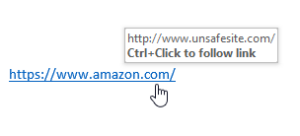
ALWAYS hover over a hyperlink to see where it is going, if the link looks suspicious never click on it and report it to IT for further review.

When keeping up to date with the current information and news go to reputable resources; be watchful of hyperlinks from such websites like Yahoo.com and MSN.com as they sell space of news feeds that could potentially lead to malicious sites, once again ALWAYS hover over hyperlinks to see where they are going.

Safe links for getting current information on the COVID-19 pandemic.

Arizona State specific: https://www.azdhs.gov

The Center for Disease Control and Prevention: https://www.cdc.gov

John Hopkins University: https://www.jhu.edu


Thank you and be safe and sane.


Starting April with some thoughts

In these trying times of fear, unreliable information, hatred, the blame game and the shameful actions of media outlets.  Before you pass quick judgment on that opening line, take a moment from your scrolling of your favorite social media choice and indulge me.

When I was younger, we believed in getting the facts and allow the individual to come to their own conclusion and was encouraged to discuss it in a calm manner.  We also were told if we did not like something on television or radio to either change the channel, turn it off or leave the room, let’s face it we didn’t always like what are parents watched as I am confident my children are unable to appreciate what I rarely watch as I now realize I did not appreciate what my parents watched.  Most every where I look now, we are overwhelmed with data and information not truly knowing what is factual, what is manipulative, or if it is a prank.

As I frustratedly watched the media over the last week to get myself up to speed with the historic events happening currently; I am saddened with the pathetic opinions of almost every news media organization out there. The even more disgusting thing to watch is the blame game; has this country and planet gotten to the point of very few individuals take responsibility for their own actions and to coming up with solutions instead of the easy point of identifying the problems?  Any idiot can identify a problem, now days it takes a brave individual to offer solutions, knowing it will be ridiculed and judged by the masses.

As we begin the month of April 2020, I am assured it will be one of the more difficult ones in our lives; with millions in this country out of work currently and the possibility of more to come, the younger generations have never experienced such an event and as the thought overcomes me with the elderly being hit the hardest with this pandemic and the knowledge and experience that will be lost in its aftermath.  We the older generations should be bearing the weight and responsibility to step up and hold back emotion and fear to ultimately calmly guide and lead our society out of this and grow stronger for it.  We have a long hard month in front of us and if we maintain a calm approach and apply logic to a seemingly out of control society, we will make it through this.

Might I recommend instead of binge watching some ridiculous show take some of that time to truly look at what is happening and see what you can do to use your natural talents whatever they may be, to better yourself, your family and your community. It will not be an easy task, as you navigate through a mine field of dis-information, irrational opinions, historical emotions, ignorance, and closed doors but I promise you it will be rewarding if you endure it to completion.

Wishing everyone a safe and sane future.

List of Installed Programs on Windows with PowerShell

PowerShell: List of Installed Programs on Windows Computers

Get the 32bit Applications:

  • Get-ItemProperty HKLM:\Software\Wow6432Node\Microsoft\Windows\CurrentVersion\Uninstall\* | Select-Object DisplayName, DisplayVersion, Publisher, InstallDate | Format-Table –AutoSize


Get the 64bit Applications

  • Get-ItemProperty HKLM:\Software\Microsoft\Windows\CurrentVersion\Uninstall\* | Select-Object DisplayName, DisplayVersion, Publisher, InstallDate | Format-Table –AutoSize


Export the results to text file:

32bit Applications:

  • Get-ItemProperty HKLM:\Software\Wow6432Node\Microsoft\Windows\CurrentVersion\Uninstall\* | Select-Object DisplayName, DisplayVersion, Publisher, InstallDate | Format-Table –AutoSize > C:\TF\Installed32bitPrograms-Desktop.txt


64bit Applications:

  • Get-ItemProperty HKLM:\Software\Microsoft\Windows\CurrentVersion\Uninstall\* | Select-Object DisplayName, DisplayVersion, Publisher, InstallDate | Format-Table –AutoSize > C:\TF\Installed64bitPrograms-Desktop.txt


Compare From One Machine to another:

  • Compare-Object -ReferenceObject (Get-Content C:\TF\Installed32bitPrograms-Desktop.txt) -DifferenceObject (Get-Content C:\TF\Installed32bitPrograms-Laptop.txt)

Previous Version – Restore

Operating System: Windows 07 Professional and above…

Infrastructure: Domain with Shadow Copy enabled.

  1. Open Windows Explorer [File Explorer - Windows 10]
  2. Navigate to the Network Drive; [Drive Letters above D:\, usually]
  3. Right-Click on the folder [Directory] in question.
  4. Select the Properties option.
  5. Select the Previous Versions tab.
  6. Go to a time period that you would like to restore and double click on the time.
  7. A Windows/File Explorer window opens find your document and copy to the location you would like to restore.

NOTE: If you do not have this option available to you, you have the wrong IT Service company…

For Images associated to the above go to: https://www.krowtena.net/destructions/microsoft/previous-version-restore.html

Return top
 
Skip to toolbar